

At a glance
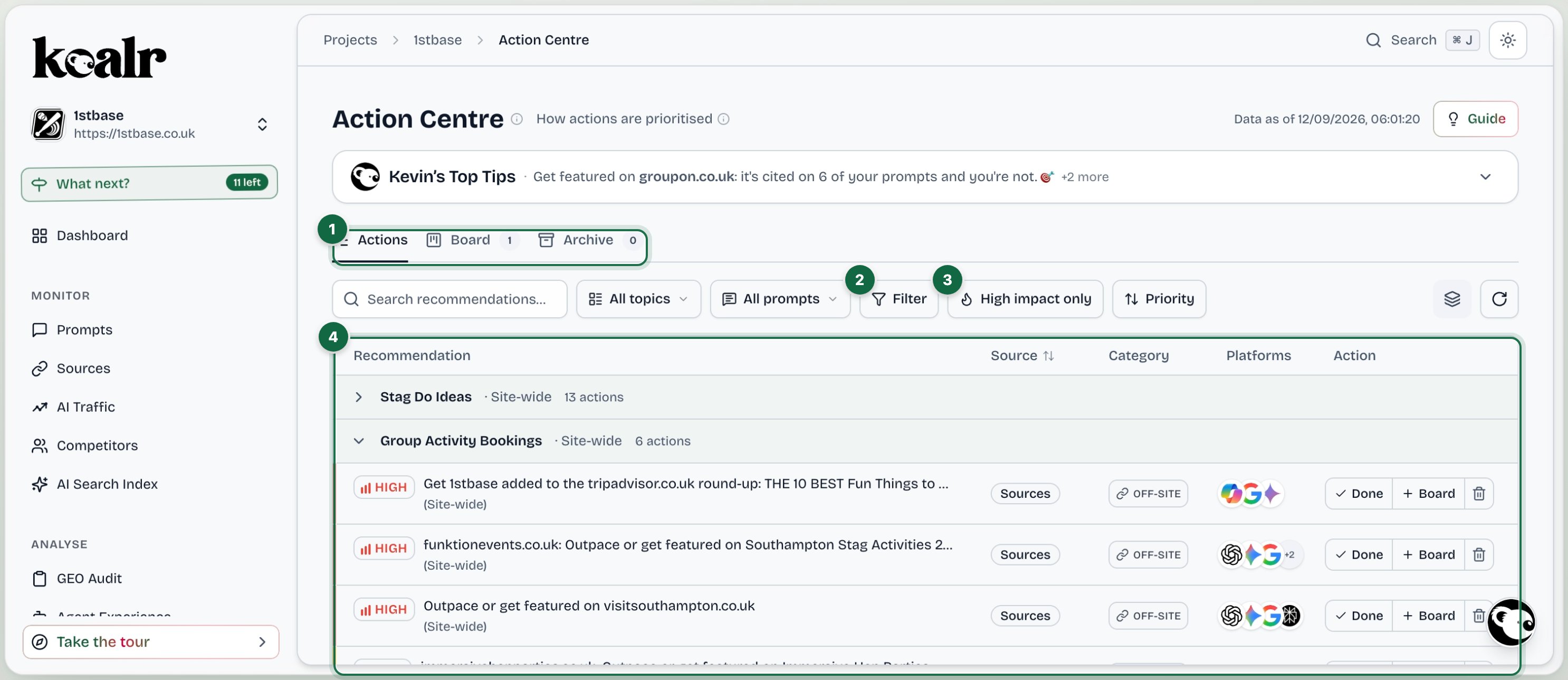
- Actions, Board and Archive
- Filter by area, impact, type, platform and more
- High impact only, and the sort order
- Actions grouped by topic and page, with Done and Board on every row
Where actions come from
Each action is grounded in real run data: real competitor URLs, real background searches, real page metadata. Every card says why this matters, what to do, its expected impact, which parts of your visibility it should move, and which analysis produced it.
How actions are prioritised
Actions are ranked by impact and effort. The default sort is Priority; you can also sort Impact: high to low, Easiest first and Recently updated, or show only high-impact actions.Three tabs
Actions
The Actions tab has two views, Plan and List, switched with the toggle beside the filters. It opens on Plan the first time you visit.Plan
The Plan turns the list into a working order. At the top is Now: Start this week, the handful of actions to begin with. Below it sit four lanes of work, in the order they pay off:
Site foundations comes first because nothing else on the site can be lifted until AI engines can reach and read it, and most of it is about an hour of developer time. Off-site comes last because it pays off slowest, not because it depends on the other lanes. Each action shows an effort band (Low, Medium or High) and the role it suits. Lanes fold to their headers so you can work one at a time, and any action can be moved to another lane or pinned to Now.
A separate Keep watch strip holds movers and prompt-depth items (prompts that dropped, track more prompts, refresh reminders). It is not a lane of work; it is what to keep an eye on.